For those using an RSS reader, here is today's post
Hey everyone, I know there has got to be someone out there who knows how to create customized art to place onto your UI. I have used the addon eepanels, and well I guess I just wasn't reading into it enough or something. What I want is to find a reader who knows how to do custom art on their UI and is willing to teach. I then will write about what I have learned and help any readers who are like me that want to learn but have no idea where to start. (large amounts of credit will of course be given). If you are interested in helping me with this project, shoot me an email at mikemage2@gmail.com
I look forward to learnign from one or more of you,
Valrot
Wednesday, December 16, 2009

Tuesday, December 15, 2009
Pitbull and it's endless possibilities.
So today I am going to talk aout the best Mod I have found out there for unit frames. On my mage (my main) I currently use pitbull for all my unit frame needs. The thing that is most amazing about pitbull, is it's amount of customization. Pitbull is configured via the use of layouts, you then apply these layouts to the different units. This is nice, because I am able to use the same layout for my target as I use for my player. Pitbull can be configured to show as much or as little information as you want. For my mage, I have two settings, one for PVP and one for PVE.
My PVE set up is designed to show me all the information I need to know about my party/raid, as well as knowing what percent the boss is at. Not a ton of information needed here, so I made it flashy and fun. On the other hand, my PVP set up for pitbull is very streamlined. it is what you see on my screenshots. It shows (in a very large lettering) my health and mana, that's it, for me everything else is just excess that I do not need on my unit frames. I use other addons for vital information, that way my information is not crowded into a small unit frame. With both my set ups, I have my unit frame and my target frame in the middle bottom of my UI, it makes it so my eyes don't have to do much moving, and helps me avoid tunnel vision when fighting.
What addon do you use for unit frames? do you use the default frame? How are your unit frames configured? What was your thought process when you set your unit frames up?
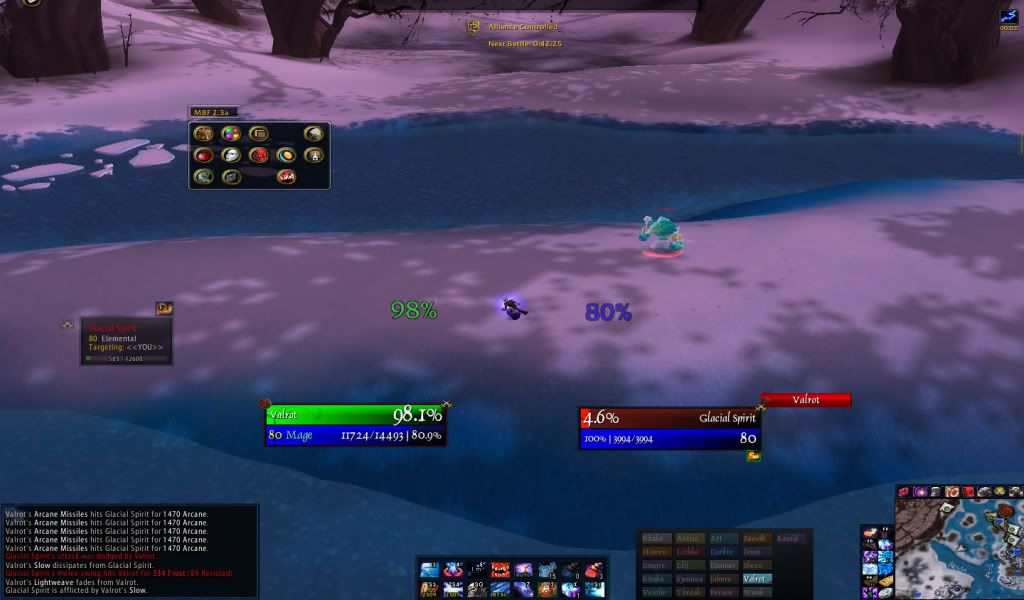

My PVE set up is designed to show me all the information I need to know about my party/raid, as well as knowing what percent the boss is at. Not a ton of information needed here, so I made it flashy and fun. On the other hand, my PVP set up for pitbull is very streamlined. it is what you see on my screenshots. It shows (in a very large lettering) my health and mana, that's it, for me everything else is just excess that I do not need on my unit frames. I use other addons for vital information, that way my information is not crowded into a small unit frame. With both my set ups, I have my unit frame and my target frame in the middle bottom of my UI, it makes it so my eyes don't have to do much moving, and helps me avoid tunnel vision when fighting.
What addon do you use for unit frames? do you use the default frame? How are your unit frames configured? What was your thought process when you set your unit frames up?
Friday, December 11, 2009
Hooray the End of All Things Sad and Depressing!
Well it's done, it may not be pretty, but it's done. I am finished with all of my finals. Beginning with a final english paper, and then a physics exam the next day, and a engineering calculus exam the very next day, I felt swamped, overwhelmed, and downright near insane. It was weeks like these which made me wonder if my choice of mechanical engineering as my major was a good or bad choice. Oh well time will tell. All of that to say: I am done with finals, I am off for 3 weeks, and I will be blogging!
Today I would like to ask what you think of action bar mods. I personally used bongos in the past followed by dominoes, and then followed by bartender 4. Last night, I tried out a new addon for action bars, macaroon. This is the first addon I have found since dominoes replaced bongos that allows you to create bars and have them have as many buttons as you want. I was so excited to see that I once again had the ability to create bars which are 1X20 or any other super random combination I could think of. What about you? What action bar mod are you using? Why do you use the one you use? and what would you like for the author to change that you think would make it better?
Today I would like to ask what you think of action bar mods. I personally used bongos in the past followed by dominoes, and then followed by bartender 4. Last night, I tried out a new addon for action bars, macaroon. This is the first addon I have found since dominoes replaced bongos that allows you to create bars and have them have as many buttons as you want. I was so excited to see that I once again had the ability to create bars which are 1X20 or any other super random combination I could think of. What about you? What action bar mod are you using? Why do you use the one you use? and what would you like for the author to change that you think would make it better?
Thursday, December 3, 2009
Finals Week
Hey everyone, Wow! it has been forever since I last posted. I am getting ready to enter my week of finals for college, then I will dive back into working on the blog. I hope to get up to a 3 times a week posting over break and be able to carry that into the next semester. I appreciate everyone's understanding behind my absence previously, but the good news is I am back and playing with addons more than ever.
valrot
valrot
Saturday, July 11, 2009
Quick Auctions
Hey guys, I wanted tos hare with you a nice little addon which makes auctioning of items you sell a lot, such as glyphs, consumables, or trade goods, incredibly easy. This addon is Quick Auctions. What it does is check the price of the item and posts yours undercutting the competition, as long as the price is over a certain amount. What makes this great for glyphs is that it will quickly check to see if you have been undercut and cancels your auction so you can go back and repost it lower than your competition.
You can find Quick Auctions here
The only real downside I have found with quick auctions is that it requires /commands to set it up.
However to combat this problem there is a very simple guide over at the justmytwocopper.blogspot.com forums about setting it up for the glpyh business, but can also be applied to many others. This guide can be found here
You can find Quick Auctions here
The only real downside I have found with quick auctions is that it requires /commands to set it up.
However to combat this problem there is a very simple guide over at the justmytwocopper.blogspot.com forums about setting it up for the glpyh business, but can also be applied to many others. This guide can be found here
Monday, July 6, 2009
Reader UI: Mygda
Hey guys, Valrot here with another interface for you guys to take a look at.
This week we have Mygda's interface, the cool thing about Mygda's UI is well it is so completely different. You see most of the usual interfaces, many of which look similar to blizzard's default or similar to mine, Mygda completely broke free of the usual for his UI. Before you go screaming anything about not liking it, you need to read what he has to say showing why his UI is built the way it is.
"After i took a look at zupa's UI and with the intention to improve the discussion about "a good and welldeveloped interface" I would also like to share my ideas. first, you can have a look at my dk's UI (appendix). I know it looks a bit strange and totally off of the ideas behind common interfaces. but let me explain my thoughts behind this: overall, i want a very minimalistic one (love those). at the same time i want all necessary information (linke omen, player and target frame, proccs) on a place where i can find them quickly. so i did a few tests on myself and found out that your eyes are in the middle of the screen in most of the time. so i put all these data to the middle. next step, i read some articles about the brain and how your two halfs works together and so on. there i found out that clear data is best recognized on the right side of your view. so i put all important data (like player/target frame, omen, rune bars) on the right side. the not important ones like chat frames and minimap are also placed in the middle, but left hand side. the result of these observations you can see in the picture. my main attacks (aren't that much for dk pve) are used via keybindings and placed on a hidden action bar. the bars over the player frame are trinkets/pots and on-click attacks like dancing rune weapon for example. also i'd filter target's debuffs and only represent my deseases. boss has just the hp perventage (the rest is displayed via the tooltip window^^) party frame is normaly in the lower right corner, more to the bottom (as a dk dd u don't really need them :p )"
And here is two pics showing off Mygda's UI:
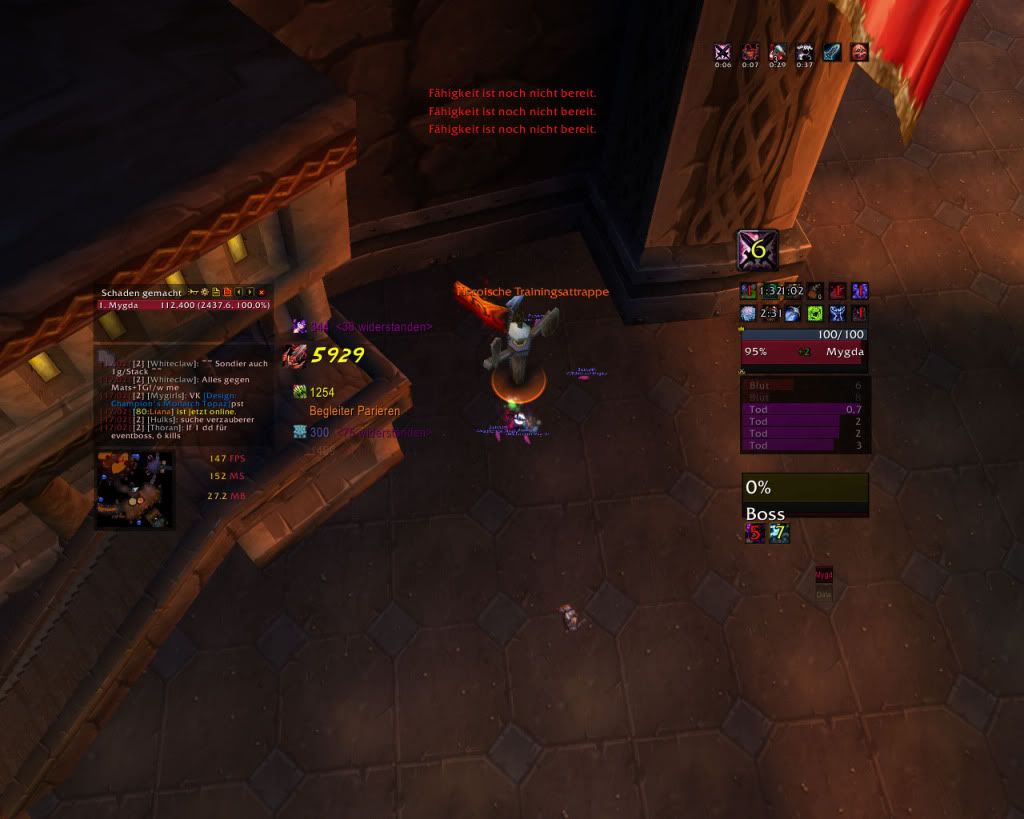
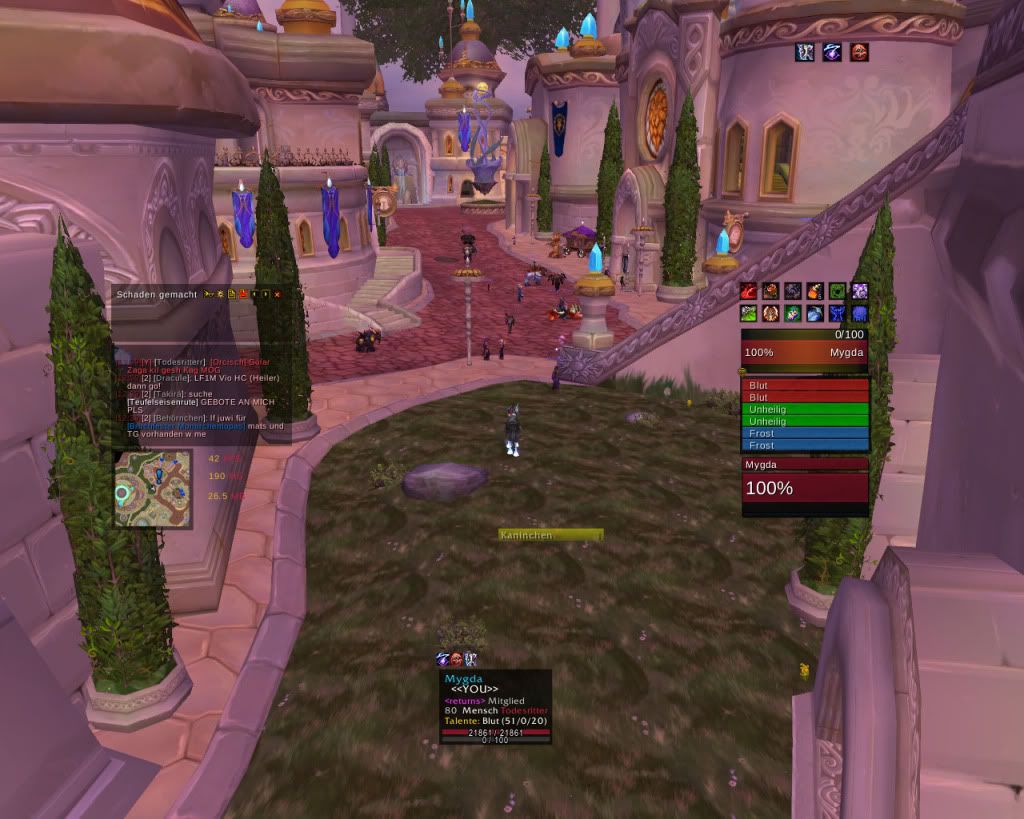
Mygda's UI is using:
AG Unit Frames
Bartender 4
Bison
Button Facade (with the Caith-skin)
Chinchilla
Debuff Filter (so you have nearly the same debuff effects like with xperl)
eePanels (so every frame is fully transparent with a panel in the background^^)(unfortunately i don't get kgpanels yet :/ )
Evil's Name Plates
Grid
Different Ace-Libs (i.e. SharedMedia for using my own fonts^^)
Magic Runes
MSBT
Omen
Omni CC
Prat
Recount
Recipe Known
Rating Buster
Stat_Block (FPS, Memory, Latency, sometimes Folks and Clock too)
TipTac
Xloot
DBM (of course^^)
I think that Mygda's research proves not only the smart choices made behind his UI, but also shows that Mygda really thought about why parts of the UI are placed where they are. Hope you guys enjoy this tangent from the normal. What do you think of this completely different design for an interface and the research made behind it.
Want to share your UI with the other readers? feel free to email me a small description as well as a screenshot of your Interface to mikemage2@gmail.com
This week we have Mygda's interface, the cool thing about Mygda's UI is well it is so completely different. You see most of the usual interfaces, many of which look similar to blizzard's default or similar to mine, Mygda completely broke free of the usual for his UI. Before you go screaming anything about not liking it, you need to read what he has to say showing why his UI is built the way it is.
"After i took a look at zupa's UI and with the intention to improve the discussion about "a good and welldeveloped interface" I would also like to share my ideas. first, you can have a look at my dk's UI (appendix). I know it looks a bit strange and totally off of the ideas behind common interfaces. but let me explain my thoughts behind this: overall, i want a very minimalistic one (love those). at the same time i want all necessary information (linke omen, player and target frame, proccs) on a place where i can find them quickly. so i did a few tests on myself and found out that your eyes are in the middle of the screen in most of the time. so i put all these data to the middle. next step, i read some articles about the brain and how your two halfs works together and so on. there i found out that clear data is best recognized on the right side of your view. so i put all important data (like player/target frame, omen, rune bars) on the right side. the not important ones like chat frames and minimap are also placed in the middle, but left hand side. the result of these observations you can see in the picture. my main attacks (aren't that much for dk pve) are used via keybindings and placed on a hidden action bar. the bars over the player frame are trinkets/pots and on-click attacks like dancing rune weapon for example. also i'd filter target's debuffs and only represent my deseases. boss has just the hp perventage (the rest is displayed via the tooltip window^^) party frame is normaly in the lower right corner, more to the bottom (as a dk dd u don't really need them :p )"
And here is two pics showing off Mygda's UI:


Mygda's UI is using:
AG Unit Frames
Bartender 4
Bison
Button Facade (with the Caith-skin)
Chinchilla
Debuff Filter (so you have nearly the same debuff effects like with xperl)
eePanels (so every frame is fully transparent with a panel in the background^^)(unfortunately i don't get kgpanels yet :/ )
Evil's Name Plates
Grid
Different Ace-Libs (i.e. SharedMedia for using my own fonts^^)
Magic Runes
MSBT
Omen
Omni CC
Prat
Recount
Recipe Known
Rating Buster
Stat_Block (FPS, Memory, Latency, sometimes Folks and Clock too)
TipTac
Xloot
DBM (of course^^)
I think that Mygda's research proves not only the smart choices made behind his UI, but also shows that Mygda really thought about why parts of the UI are placed where they are. Hope you guys enjoy this tangent from the normal. What do you think of this completely different design for an interface and the research made behind it.
Want to share your UI with the other readers? feel free to email me a small description as well as a screenshot of your Interface to mikemage2@gmail.com
Sunday, July 5, 2009
Moving
Hey guys, sorry for the lack of posts, this past week was full of me packing stuff getting ready for my family's move. I will have a post up tomorrow.
Subscribe to:
Posts (Atom)